Qwen-Image-Edit FP8 & GGUF - Q3_K_M.gguf
Highlighted images


Recommended Prompts
transform the image into 3D cartoon style, a war girl samurai cyborg robot, highly detailed, devil-armor, face mask, holding 1 heavy sword, detailed sword, the sword has a long hilt, grip the hilt, steady hold of the sword, (high kick:1.3) #### Fooocus: ['Misc Dystopian', 'Fooocus Masterpiece', 'Fooocus Negative', 'Fooocus Cinematic', 'Fooocus Photograph'] ####
Recommended Parameters
samplers
steps
cfg
Tips
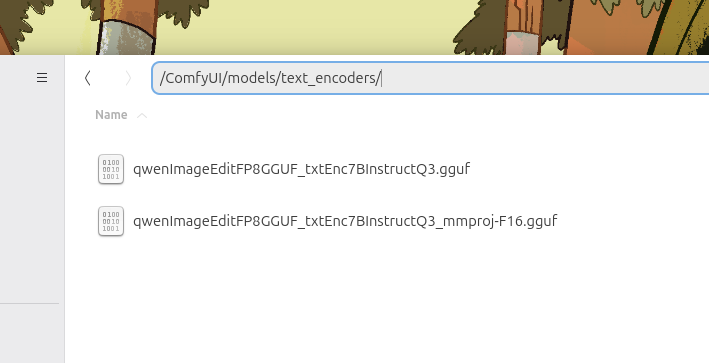
Ensure the text encoder files have matching names: whatever_text-encoder.gguf should be paired with whatever_text-encoder_mmproj-F16.gguf to avoid errors.
Rename the mmproj file correctly if loading errors occur.
Check the FP8-optimized text encoder available at: https://civitai.com/models/1864281?modelVersionId=2110105
Use the GGUF workflow for best compatibility: https://civitai.com/models/1881851/qwen-iamge-edit-gguf-lightning-4steps-comfyui
Creator Sponsors
Error: Can't find mmproj file for 'Qwen2.5-VL-7B-Instruct-Q3_K_M.gguf' (matching:'qwen2.5-vl-7b-instruct')! Qwen-Image-Edit will be broken!
Rename the mmproj-F16:
Make sure the downloaded text encoder has the correct file naming (whatever_text-encoder.gguf paired with whatever_text-encoder_mmproj-F16.gguf)
Demo: https://chat.qwen.ai/
Text encooder FP8: https://civitai.com/models/1864281?modelVersionId=2110105
Workflow GGUF: https://civitai.com/models/1881851/qwen-iamge-edit-gguf-lightning-4steps-comfyui
This FP8-optimized (e4m3fn) conversion of Qwen-Image-Edit, now fully compatible with the latest Qwen-VL image editing features! Leveraging Alibaba's advanced multimodal AI, this model enables seamless text-guided image manipulation, perfect for precise edits, prompt-based adjustments, and creative refinements. The model is mirrored here for convenience.
Contributor

Model Details

Discussion
Please log in to leave a comment.
Model Collection - Qwen-Image-Edit FP8 & GGUF

Images by Qwen-Image-Edit FP8 & GGUF - Q3_K_M.gguf
base model Images
